


In the highly competitive pre-built gaming PC market, off-the-shelf components have become more attractive than ever, as hardware manufacturers often obtain critical components like graphics cards faster and at lower prices than consumers.
However, gaming PC buyers are often concerned about how expandable and, therefore, future-proof a manufacturer-supplied gaming PC will be compared to a DIY PC. We tested Lenovo Legion Tower 7i and carefully examined these important issues, as well as performance indicators.
Configuration and parameters tested during testing.
Our test unit is equipped with an Intel processor. i7-11700K , 16 GB RAM (Kingston DDR4 @ 3192 MHz), video card GeForce RTX 3070 with 8GB of memory and a Samsung SSD 1 TB capacity (model MZVL21T0HCLR-00BL7). We estimate its price to be around $2,400.
| 11th Gen Intel® Core™ i7-11700KF Processor (3.60 GHz, up to 5.00 GHz with Turbo Boost, 8 cores, 16 threads, 16 MB cache) |
| 16 GB DDR4 3200 MHz (2 x 8 GB) |
| 1TB PCIe SSD |
| NVIDIA® GeForce® RTX™ 3070 8 GB |
| 802.11AX (2 x 2) and Bluetooth® 5.0 |
| 170W liquid cooling |
| 650W power supply |
I've seen more CPU options for this case, including the Intel i7-11700KF (without integrated graphics) and the i9-10900K. Other graphics card options also include the RTX 2070 Super (8GB), RTX 3060 (12GB), and RTX 3080 (10GB).
However, I expect Lenovo to update this model with newer processors and graphics cards as they become available, so keep an eye on the latest specifications. This design has been around since the 10th-generation Intel processors.
Industrial design


Body and overall design gaming desktop PCs are important because many people use their computers for years , and then replace the internal components. For example, I have a red and black Antec Lanboy Air case, purchased in 2011, and it now runs the latest Intel Gen12 platform flawlessly.
Legion Tower 7i 34 liters in volume and weighs 27.6 pounds It features a sleek design and an outstanding aesthetic balance between classic and gaming styles, especially with the LED backlighting enabled. Our model also features additional transparent side cover , which allows you to demonstrate the internal components.


The left side of the case is a solid metal panel that conceals the cable management area. Overall, I found the cables to be neatly tucked away and fairly well organized. You'll need a Phillips-head screwdriver to open the side panels, but the screws are almost recessed into the panel.

As for lighting, the internal 120mm fans (case + CPU cooler) have multiple RGB LEDs that can be controlled via Lenovo Vantage software. The default setup looks nice, especially with the transparent side panel. I didn't modify anything, but it's possible.

Cooling
The triple-fan layout on the front panel is a trendy feature, and similar designs can be found in DIY cases like the CORSAIR Carbide, MUSETEX Phantom, and others. Therefore, even in its standard configuration, the Legion Tower 7i truly feels like a custom-built gaming PC.


The front and top parts of the body are made of rigid metal mesh , which provides excellent cooling and air circulation. In practice, the airflow is the same as if the case were open, but it still looks pristine and protects the components.
The rear panel is also well-ventilated, right down to the perforated expansion slot covers. These are areas where many manufacturers could have skimped, but I appreciate Lenovo's attention to detail.
Air also comes from the bottom, so Lenovo has provided dust filter to capture most of the dust. This is especially useful if your computer is on the floor, but even on a desk, it's a significant dust accumulation point.

Pre-installed liquid CPU cooling system With two 120mm fans, it creates a cleaner interior and improves cooling compared to a standard radiator. The more expensive and powerful your processor, the more you need (preferably) a liquid cooling system.
Big and very quiet video card also has a more than adequate air cooling system and is even held in place by durable bracket , which will be very useful when transporting to a LAN party. Power is supplied by a single 8-pin connector.

Our 650W gold-certified power supply It has its own cooling zone and is partially isolated from the rest of the case to prevent heat from leaking from the power supply to the rest of the chassis. If you purchase a more powerful graphics card or processor, your power supply may differ slightly to meet your system's power requirements.
Expansion and modernization
What I like about this Legion Tower 7i case, The key is that it uses standard components. Sure, the standard full-size ATX motherboard is designed specifically for Lenovo, but you can easily swap it out for another one, and everything will work just fine.
Using standard components is of utmost importance to many gamers, as some manufacturers use proprietary designs that are incompatible with retail PC components, which can severely limit the ability to upgrade important components like the motherboard or graphics card.
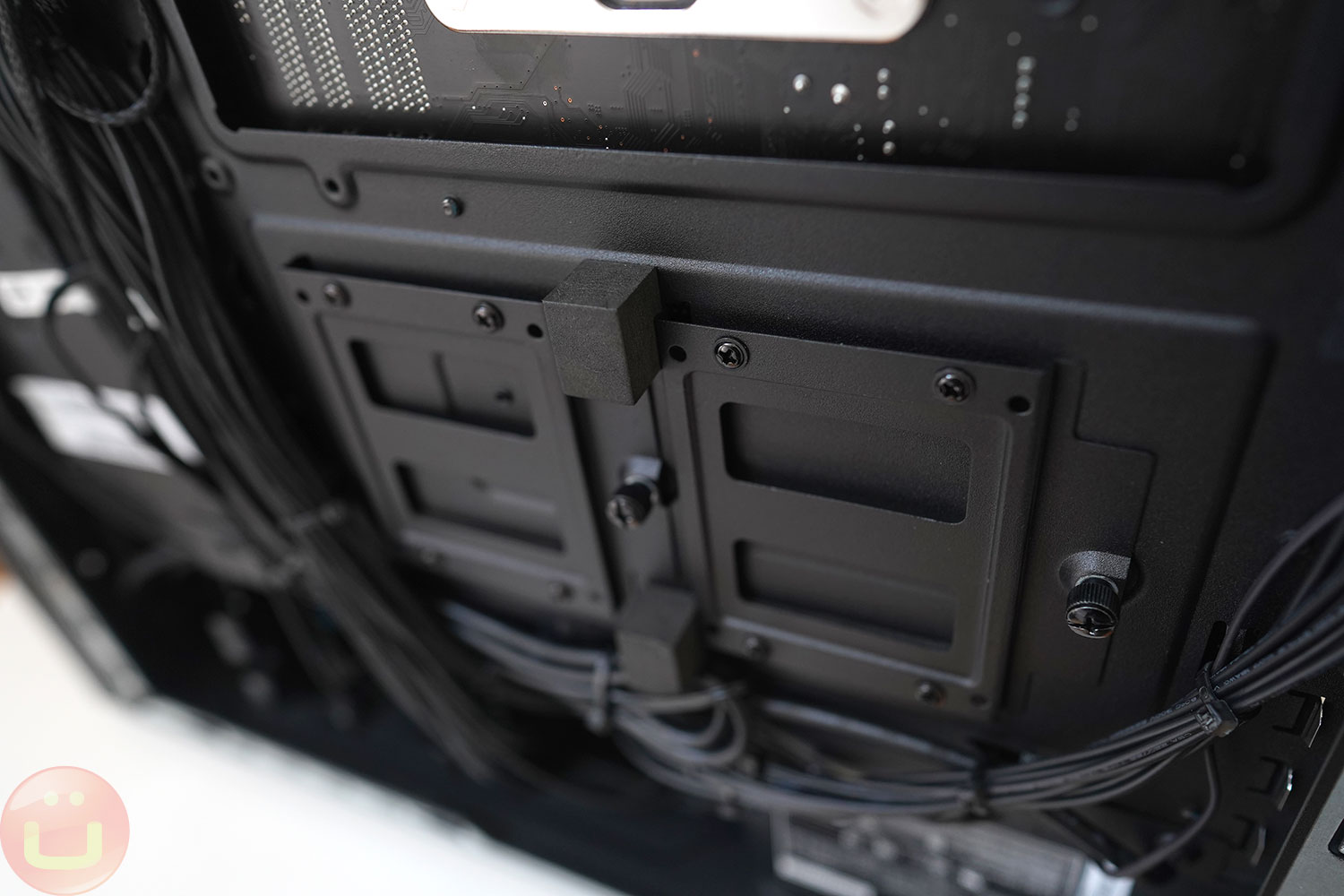
Inside you will find two slots for 2.5-inch SATA SSD/HDD drives With ready-to-connect cables (great!). I don't use SATA drives now, but they're convenient in terms of gigabyte/price ratio if you need a lot of storage.
There is on the motherboard two 3.5-inch SATA slots, If you use mechanical drives or any other devices that fit in the same space, you'll need to add a SATA port. There are six SATA connectors on the motherboard in total, so if you need more, you can use them.

In the case of PCIe SSDs, the pre-installed drive is located next to the CPU slot, and the second m.2 slot (of two total) is located on the bottom of the motherboard.
If you need to add more RAM, there are four slots in total, which is standard for non-workstation motherboards. 16GB should be enough for gaming, but for DCC, I'd go up to 32GB or more.
Ports


Typically, the number of available ports on a desktop computer isn't a concern, and there are plenty of them here, located on the back and top. However, I would have liked to see at least one Thunderbolt (TB) port for connecting to a Thunderbolt dock.
Sometimes you may need to use such a fast computer as a workstation , and in this case, having more external connectors would be an ideal solution.
The Legion Tower 7i does not come with an external Wi-Fi antenna, but it does support Wi-Fi 6 , which provides an excellent wireless connection if your router supports it. Alternatively, I prefer to connect gaming computers to a wired network port to ensure minimal latency.
System performance
As you might have guessed from the specs of our test sample, The processor and graphics card performance are very good for their category and reflects the quality of the components. Thanks to the excellent cooling system, we expect this processor and graphics card combination to perform as well as its thermal (+ ambient temperature) and power consumption allow.


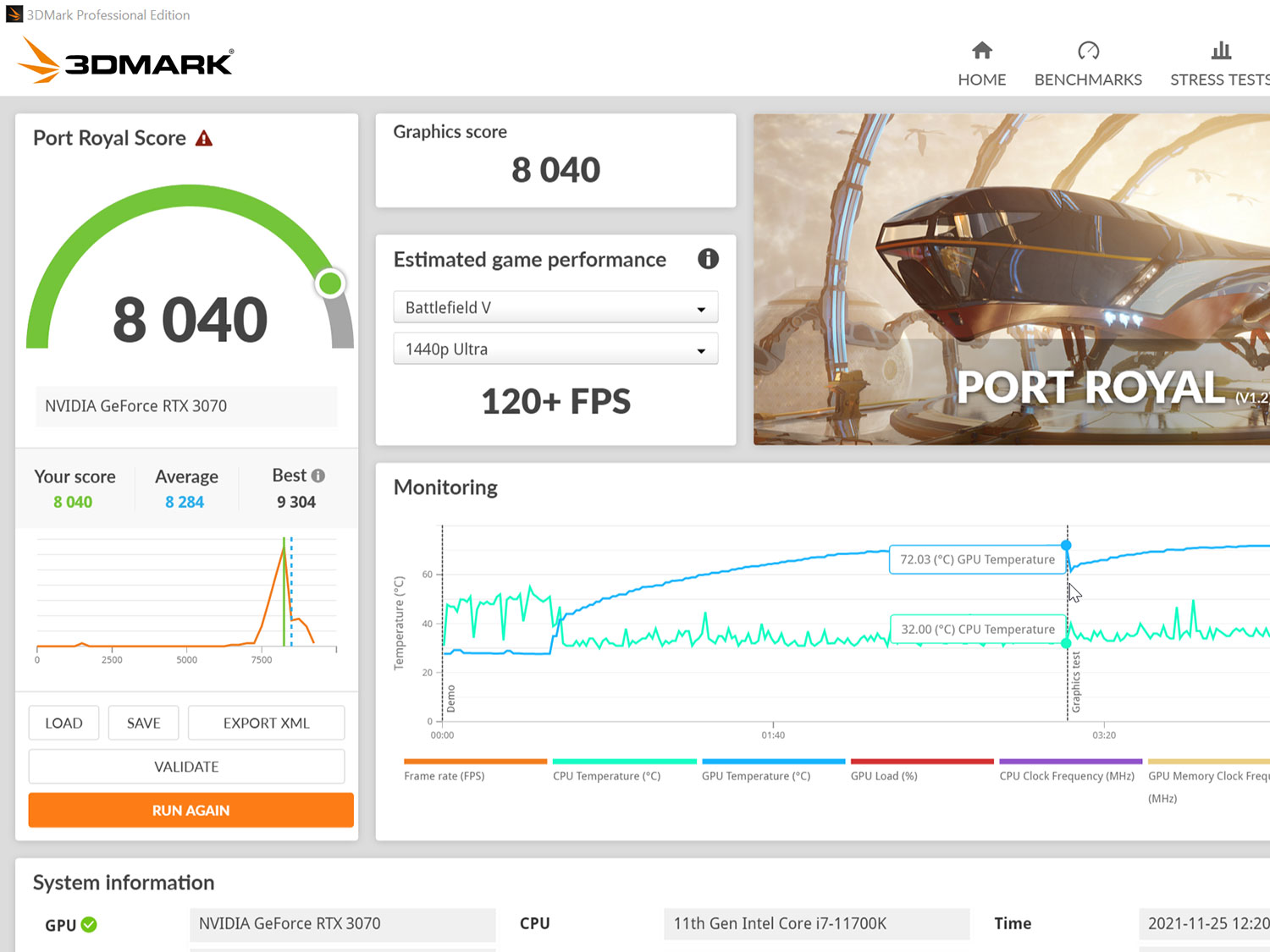
By default the case is working very quiet , even when the graphics card is loaded at 100% for an extended period. If desired, you can try turning the fans to maximum speed and increasing the noise level, but in practice, I don't think this is necessary.
Results 3DMark show that this configuration is included among the best by all accounts, and that's to be expected. If you want to use it as a workstation, I've added a test Cinebench R23 (software 3D rendering).

As we mentioned earlier, if you need more CPU performance, consider the Core i9 variant or wait for the version with 12th Gen Intel Alder Lake processors, as we've had great results with them.
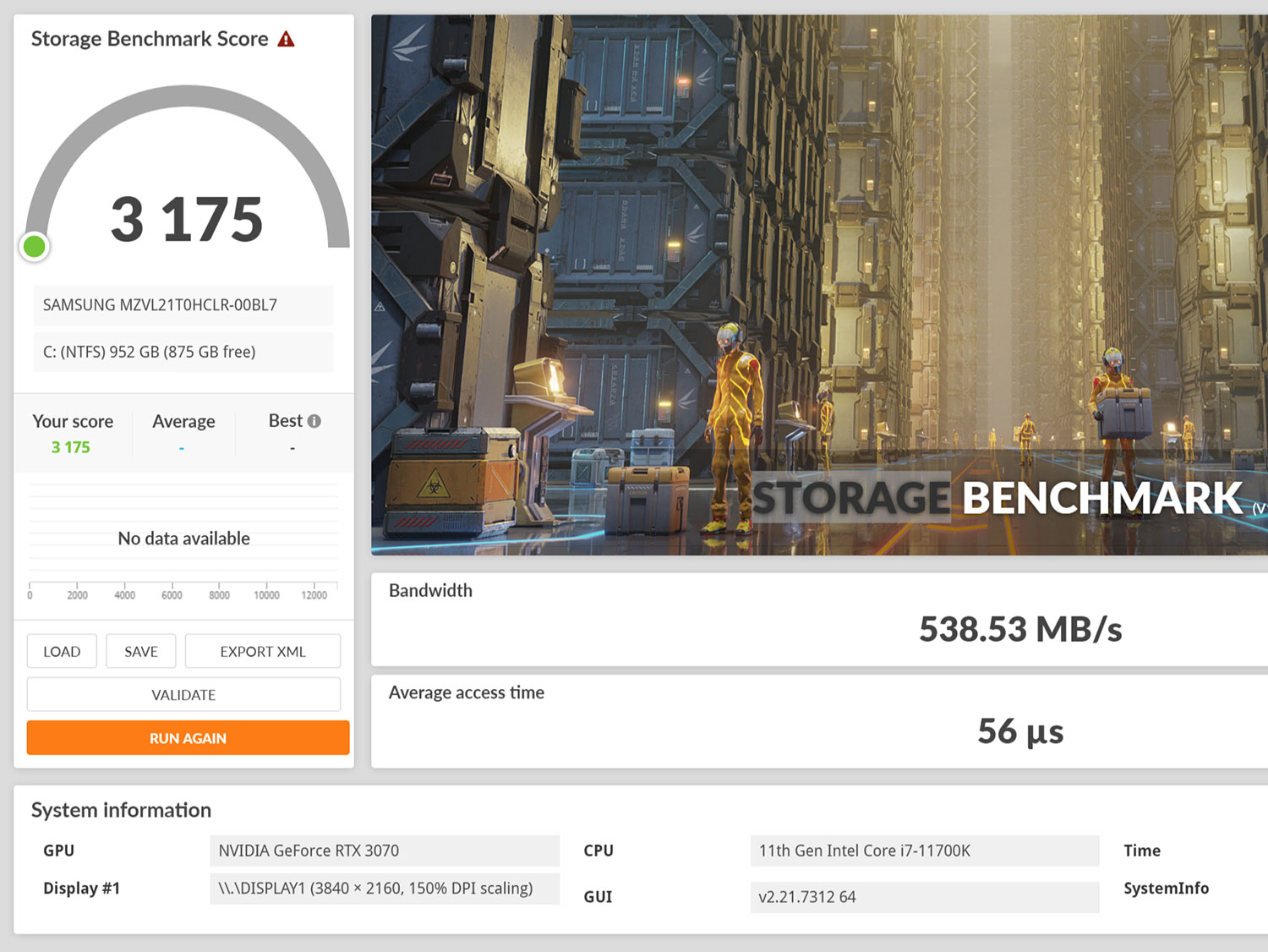
The SSD also delivers pretty good performance for a single-drive configuration and fully meets expectations in this price range. I'm not aware of a RAID 0 option, but that's usually not a priority for gamers, as Any additional funds should ideally be spent on a faster graphics card .
Conclusion
The Lenovo Legion Tower 7i makes me think highly of pre-built gaming PCs. I've always built my own computers from scratch, and building one myself always gives you the ultimate level of control, something no manufacturer can match.
However, this gaming PC is very well built, and I'm quite happy with Lenovo's design, and I think many buyers and potential buyers will agree. This PC meets all my design and expansion requirements.
Performance meets our expectations for the configuration, and the computer's speed isn't limited by the cooling system or any other technical solutions. We're seeing performance at the limits of the processor, graphics card, and RAM combination. If your budget allows, you can choose an even more powerful graphics card and processor configuration.
Given the state of the PC component market, it may be easier and cheaper to purchase these components through this Lenovo computer than to build the computer yourself.
High performance
- Very successful chassis design.
- Excellent performance in its market segment.
- Efficient and silent cooling system
- Compatible with third-party components.
Low performance
- There is no Thunderbolt port.
Rating + Price
- Rating : 9,4/10
- Price : ~2400 dollars.