

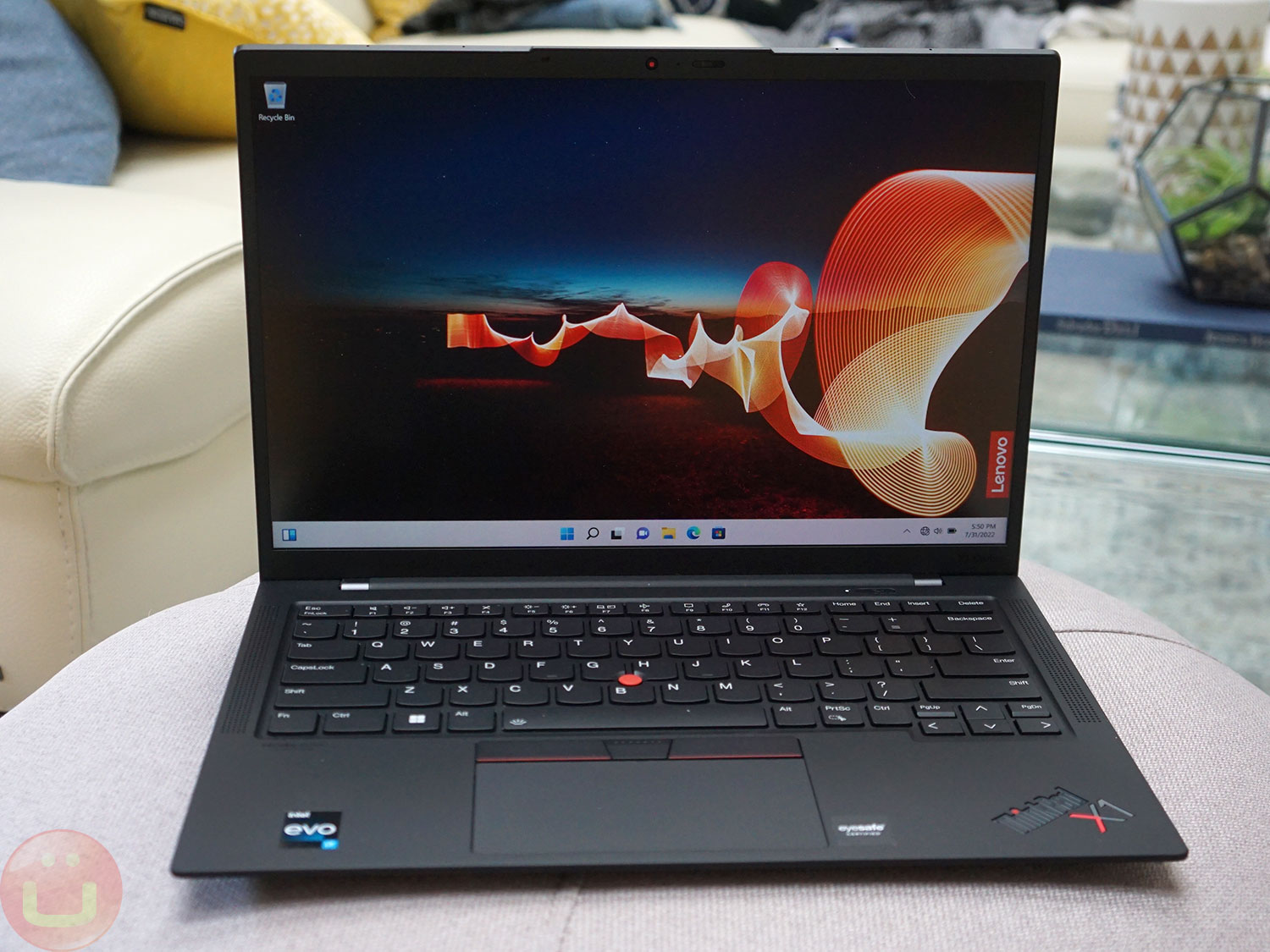
Lenovo ThinkPad Carbon X1 Gen 10 — is one of those «executive» laptops that many companies and individuals include in their shortlists. This has been the case for years, but the X1 Carbon Gen10 model pushes the boundaries. It features new display options and Intel Gen12 processors, which have significantly more cores than last year's models. Let's put it to the test!
Configurations
Our sample had the following specifications: processor Intel i7-1260P , 16 GB RAM, 512GB SSD (Samsung MZVL2512HCJQ-00BL7), touch screen 1900×200 with 500 nits of brightness, a Windows Hello IR webcam, and a ThinkPad Privacy Guard screen protector. It retails for $2,269 at CDW, but check Lenovo.com for great deals.
The ThinkPad X1 Carbon Gen 10 is highly configurable and available in a variety of configuration options. Nine processor options Ranging from the Core i5-1235U (10+8 cores) to the Core i7-1280P (14+8 cores)—12th-generation Intel P-series mobile processors—all feature integrated Intel Iris Xe Graphics.
The main processor is paired with 8/16/32 GB of LPDDR5-2000 RAM, soldered to the motherboard. 16GB should be enough for most users. , and if you need 32GB, we hope you know why. Storage options include SSD drives with capacities of 256/512/1024 and 2048 GB via PCIe 4.0 (versus 3.0 previously).
Fortunately, the SSD is easily accessible by removing a few screws securing the bottom cover, making it easy for users to replace or upgrade.
Design

Lenovo has maintained the overall design of the ThinkPad X1 Carbon, similar to last year's model. There are some changes compared to the 9th-generation model, but the overall concept and chassis are similar enough that it's difficult to distinguish one model from the other from a distance.
The ratio between its weight in 2.48 pounds (1.12 kg) and system performance (more on that later) are among the many reasons for the Thinkpad X1 Carbon's popularity. Its exceptionally light weight is achieved through a carbon fiber and magnesium construction.

Less flashy, but no less important, Lenovo uses significantly more recycled materials (including plastic) than before. Even its packaging is 90% recycled or sustainably sourced.
Combined with durability ( spill-resistant keyboard , MIL-STD-810H certification ) This device has always been hard to beat, and that remains true for the 10th generation. Finally, when you add hardware and software security, as well as physical protection (nano-Kensington port, multi-layered BIOS protection), it becomes clear why it's a favorite choice for businesses.
Keyboard / Touchpad


The keyboard has a typical ThinkPad layout (including the Fn key in the lower left corner), and while the key travel isn't as deep as on larger ThinkPads, the overall feel is familiar and comfortable. Lenovo has maintained this principle for years, and we'd like to use our individual ThinkPad keyboard reviews as a guide.
As we mentioned, the keyboard is spill-resistant and has two-level backlighting, ensuring readability in low-light conditions. This keyboard is also designed to use the keys as «air intakes» to cool the computer. It's a great idea.
The glass touchpad measures 56 x 110 mm (2.20 x 4.33 inches), is large, and incredibly smooth. Part of the surface is taken up by three physical buttons (compatible with Linux), and we think this is well-deserved. Alternatively, it's also a touchpad, so you can click directly by pressing the touchpad.
Ports

The laptop's chassis is thick enough to accommodate all the necessary full-size ports, so in most cases there is no need for adapters. Two USB-A ports (full-size) 3.2 Gen1 and two USB-C Thunderbolt 4 ports (40 Gbps, Power Delivery 3.0 and DisplayPort 1.4a) is the best way to connect to a docking station and external monitors.
Full-size HDMI port (4K/60) is extremely useful for those who frequently give presentations and may need to connect to a projector without worrying about forgetting or losing the adapter - what a great selection of ports!
Considering the increasing number of thefts these days, nano-protective port in Kensington, It seems to have become a necessity in some urban areas, and thieves may be switching to easier targets. It also gives you peace of mind when you leave your laptop on your temporary desk during your lunch break.
2x USB-C TB4 (1 USB-PD) 2x USB-A 3.2 Gen1 (left/right) 1x full-function HDMI 4K/60Hz 3.5mm (speaker + microphone) Kensington nano security anti-theft lock Nano SIM card tray (optional, right)
Sound quality


The sound quality is excellent. Watching movies or TV shows is enjoyable, and voices are clear (this is also important for video conferencing). The sound is loud enough, but more bass would be nice. The bass level is expected for this type of ultra-lightweight computer, so it's hard to complain.
Frequent travelers often use headphones, which provide better spatial sound while maintaining a quiet environment for their roommates.
Screen
Lenovo offers up to seven different configurations 14-inch displays with an aspect ratio of 16:10. From standard resolution WUXGA (1920×1200) with a brightness of 400 nits up to 4K WQUXGA (3840×2400) touchscreen with excellent color rendering.
One of the most interesting display options is OLED display with 2.8K resolution (2880×1800) , supporting HDR at brightness 500 nits . Maximum brightness is necessary for HDR content, but for multimedia applications, we generally prefer OLED. For professional creative work, IPS LCD screens can provide slightly more accurate color reproduction.
Our review unit features a 1920x1200 touchscreen display with excellent brightness (500 nits) and color accuracy (100% sRGB, 1.3 Delta-E). It's perfect for light creative work (photo editing, web development), and we don't think we need anything more for our needs. However, Lenovo offers a variety of more advanced options, such as 4K HDR400.
The display flips back 180 degrees, So you can lay it flat on the table, which can be handy if you're using a touchscreen or giving a presentation to someone sitting across the table. And yes, the lid can be opened with one finger.
The ThinkPad X1 Carbon laptop can support four independent displays (native + 3 external) thanks to Thunderbolt (5K/60) and HDMI (4K/60) ports.
Webcam
Our camera is FHD 1080p with an IR webcam and electronic privacy shutter, but Lenovo also has more affordable 720p options.
The 1080p camera significantly outperforms Lenovo's previous 720p laptop webcams in terms of detail and noise levels. We highly recommend choosing the camera with the best specifications if you frequently participate in video calls.
Lenovo also offers software camera features that put the laptop into a low-power mode when you're away from the computer. The infrared camera makes logging in quick and easy, even with a very strong password.
System performance
As expected from the processors Intel 12th generation , The new ThinkPad X1 Carbon delivers excellent CPU performance, delivering nearly 50% higher multi-core performance (Geekbench, Cinebench) than last year's X1 Carbon. This performance boost is achieved despite the fact that this processor is a low-power model optimized for energy efficiency rather than speed.
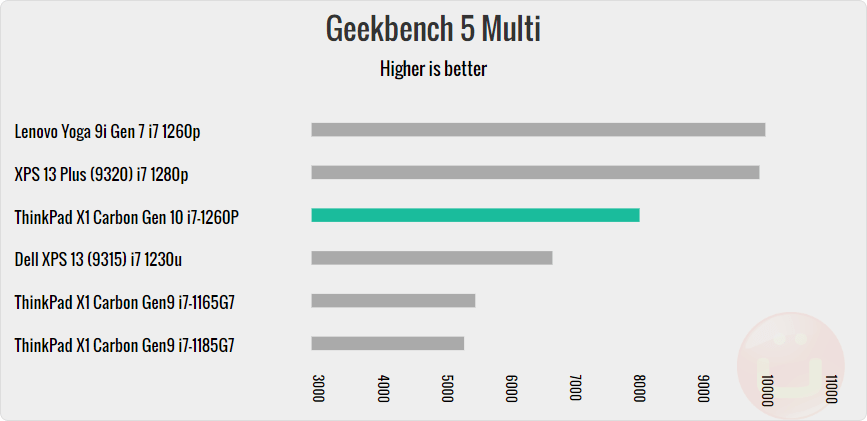
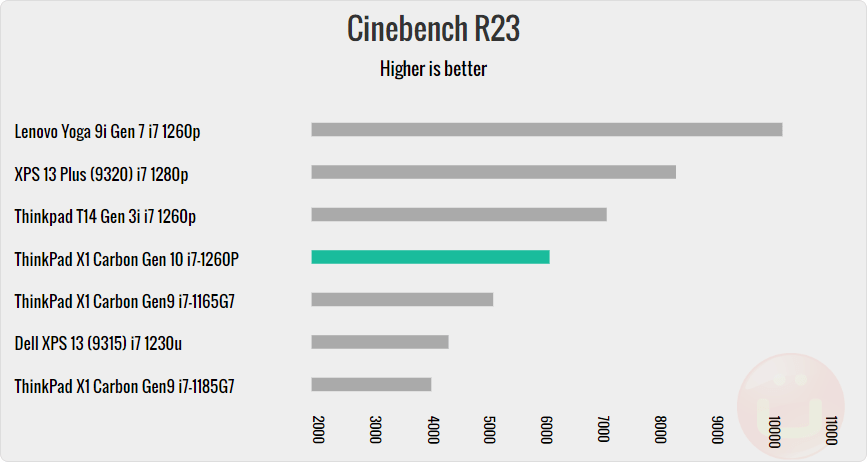
Graphics applications also perform well, and popular games like Fortnite or Doom Eternal can still run at 30 frames per second (medium settings) and be playable. However, you should be realistic about the situation, as there is no discrete graphics processing unit (GPU). Lenovo has other laptops if you need that kind of graphics power.
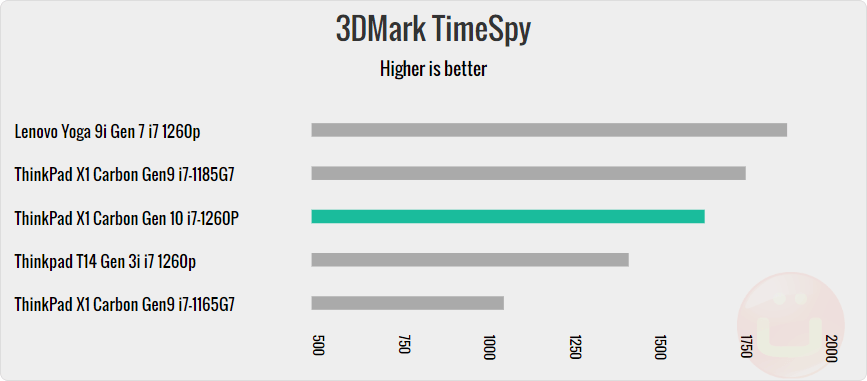
The ThinkPad X1 Carbon doesn't get very hot. Surface temperatures typically start to feel uncomfortable at 44 degrees Celsius, and the hottest spots on this computer under load reach around 48 degrees Celsius, which isn't all that hot.
The system self-regulates performance, preventing excessive heating. The fans operate silently, especially if you look at the exhaust system. It's clear the computer is optimized for quiet office work and simple creative tasks.
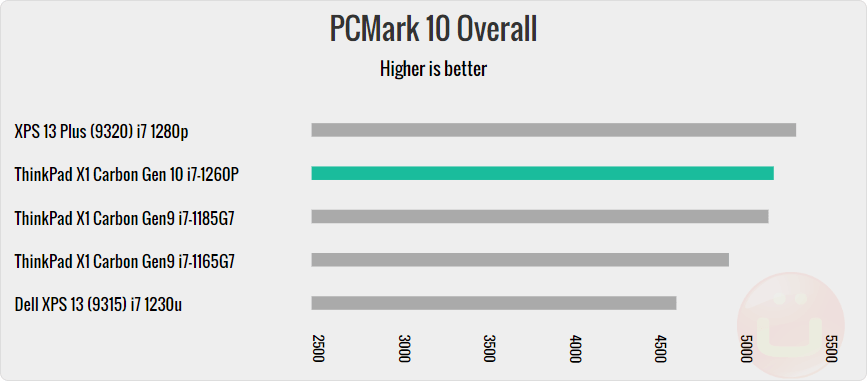

In terms of network capabilities, this new model features a WiFi-6E module (as opposed to WiFi-6 in the previous version) and optional 5G or 4G support, ensuring constant connectivity and added security as you avoid using Wi-Fi hotspots.
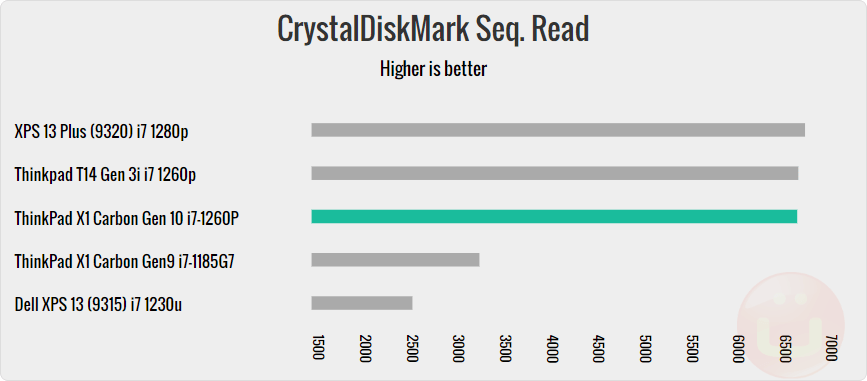
Finally, SSD performance has improved significantly compared to last year, delivering some of the highest results in this category – a year-over-year comparison is shown in the chart below.
X1 Carbon Gen 10 Battery Life
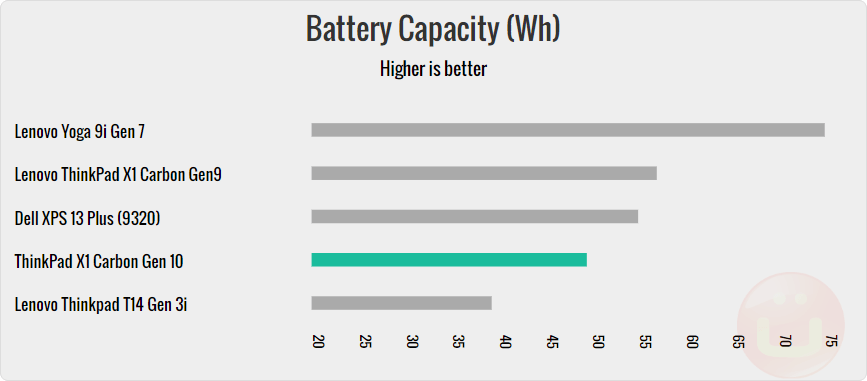
Lithium polymer battery with a capacity of 57 Wh unchanged from last year, and this capacity is significant for this category. As expected, the ThinkPad X1 Carbon Gen10 demonstrates outstanding durability and can play video for more than 11 hours . Local video playback is often a good indicator of battery life when performing simple tasks.
Note that higher resolution displays drain the battery faster, and you can also opt for an Intel U-series processor, which uses even less power (up to a Core i5-1235U).
The charging speed remains the same (0.76 Wh/min), and we didn't notice any changes. The charger is still Lenovo's compact 65W model.
Conclusion
The Lenovo ThinkPad X1 Carbon Gen 10 laptop delivers powerful performance in an ultra-lightweight design, and it's no wonder it remains one of the most popular 14-inch laptops for business use. We've recently started seeing it offered as the default laptop for employees alongside the MacBook Pro. It's a great choice.
It comes in a variety of different configurations, making it effective for a wide range of use cases, from basic office work to light creative work and development.
Consumers can find similar performance features for a lower budget in the Yoga line, but they lack the security, ease of use, and durability of ThinkPads. So, yes, there is a price difference, but it's truly worth it.
Why should you buy this particular laptop?
The ThinkPad X1 Carbon's performance-to-weight ratio, security features, and durability set it apart from other ultralight laptops. Your IT department will appreciate the vPro remote management and security features. However, the accounting department might think twice about choosing it because of the price.
Potential competitors
Data shows that users considering this laptop also consider the following computers (in this order): the ThinkPad T14, Apple MacBook Pro, Dell XPS 13/13 Plus, ThinkPad P1, and Yoga 9i. In our opinion, the ThinkPad T14 isn't a competitor to ultralight laptops, but it offers the same level of security and durability.
The XPS 13 is more compact thanks to its 13.5-inch display, but it's heavier and has a slightly smaller battery. The Yoga 9i is a powerful consumer product, but it won't offer the same level of security and durability.
In conclusion, the MacBook Pro is an excellent business computer, but this choice is dictated by the choice of Max/Windows operating system, and the hardware is secondary. If you're a Windows user, we recommend the ThinkPad X1 Carbon Gen 10.
High performance
- Ultra-light and extremely durable
- Very good performance and battery life.
- Lots of full-size ports
- Flexible configuration
Low performance
- No discrete GPU.
- The sound lacks bass.
Rating + Price
- Rating : 9,6/10
- Price : ~2269 dollars.